
Will Windows Still Be Windows?
When the operating system begins to work on your behalf, it changes not only how we use computers, but what an operating system actually is. Microsoft is building Windows for a world in which AI agents can use apps, data and services on behalf of people. But as more companies build their own agent platforms, questions about compatibility, security, control and accountability grow with them.
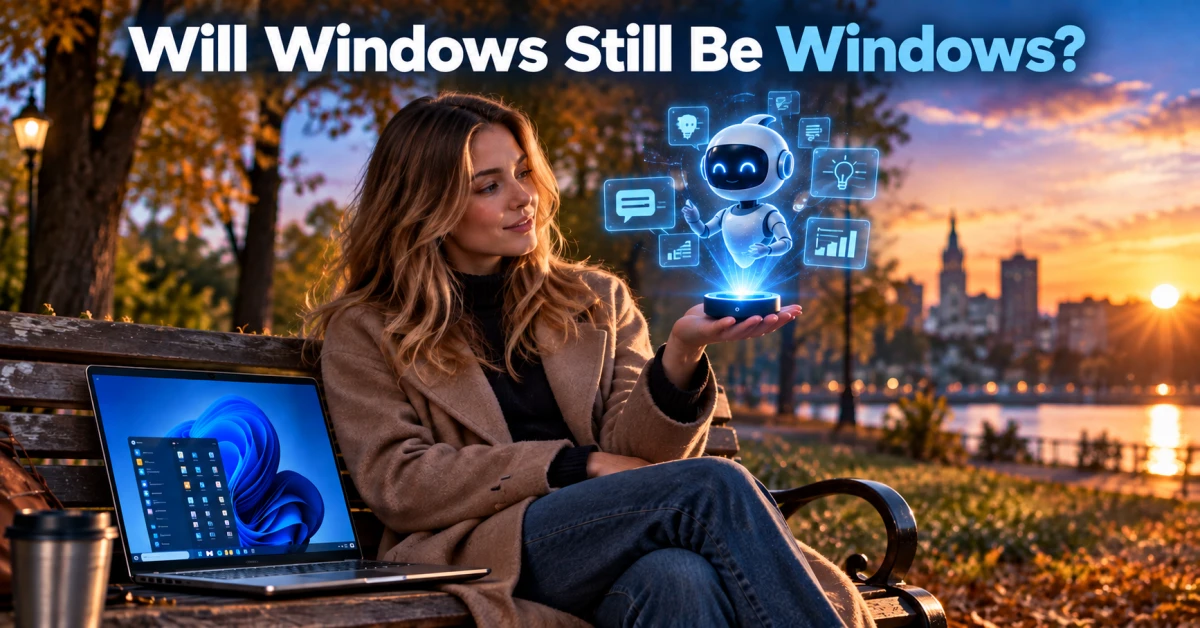
For decades, Windows has been the layer that launches programs, stores files and waits for a person to decide what happens next. Its basic model is familiar: human → app → data → result. AI agents introduce another possibility. Given an instruction in ordinary language, they can select tools, work across services and sometimes take bounded steps on a person's behalf.
That does not turn Windows into a finished “agentic operating system” overnight. It does change the problem. When people, apps, cloud services and several companies’ agents need to work together, the key question is no longer simply what the next Copilot feature can do. It is how control, security and accountability hold up when the computer can also use the computer for us.
Windows Was Built for People
An operating system manages processes, files, user accounts, permissions and hardware. Automation is not new: scripts, macros and batch jobs have long handled repeatable work. An agent is different because it can receive a goal, choose among tools and attempt the next step without every decision being written in advance as a rule.
Once an agent can read a file, open an app or propose an action, accuracy is only part of the question. Who authorised the access? Which data did it use? Can the action be stopped or reversed? Those questions begin to move from individual applications into the platform itself.
Now the Operating System Has New Users
Microsoft’s agent direction consists of components at different stages of maturity. It should not be described as a completed, generally available agent computer. Copilot Actions on local Windows has been documented as an experimental Insider feature. Microsoft describes an Agent Workspace where Copilot can work with local files in an isolated environment, with its own desktop, bounded access and a way for the person to observe or take over.
The documented Insider rollout excluded the EEA. That does not establish that Copilot Actions or Agent Workspace is generally available in Sweden. The separate-agent-account model is still significant: an agent should not automatically inherit the person’s full privileges, but receive access that is explicitly granted and can be withdrawn.
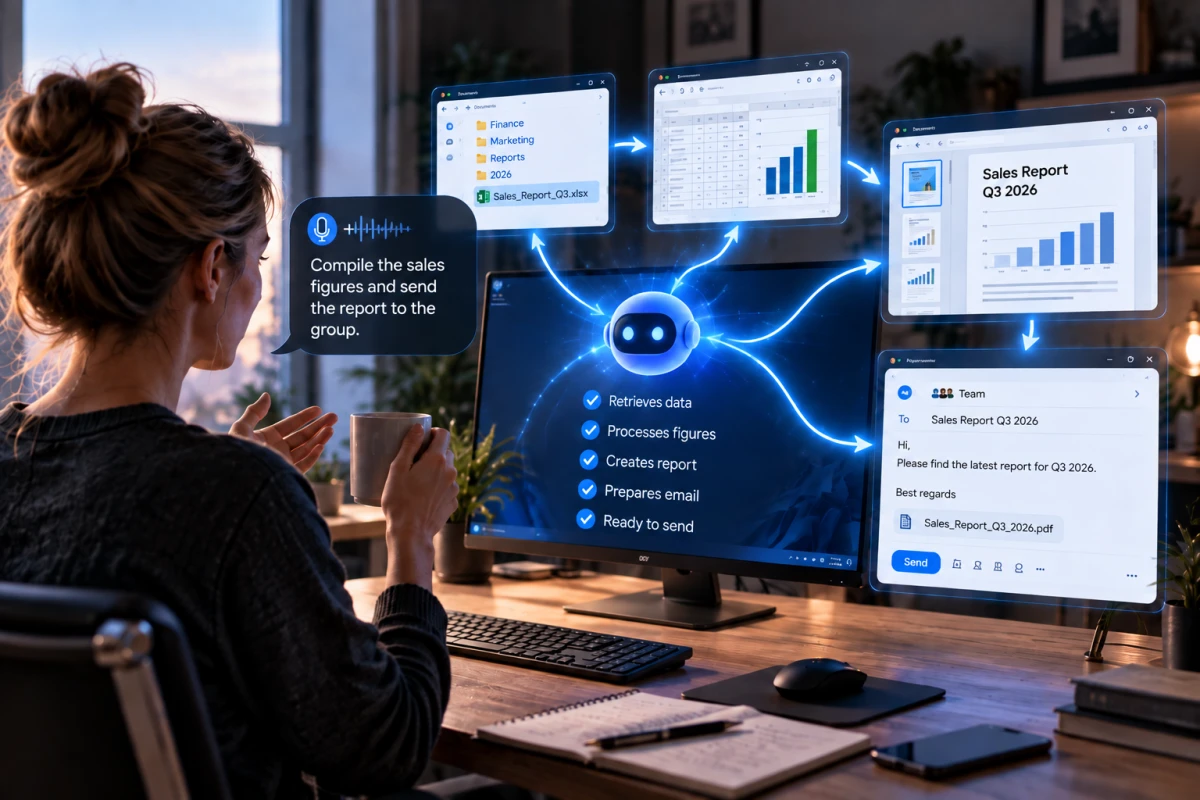
Consider an ordinary request: “Compile the sales figures and send the report to the group.” An agent would need an identity, appropriate rights, the right files or apps, the correct data, perhaps access to another system, and a record of what it did. Identity, least privilege and isolation are no longer merely app features; they become operating-system questions.
For enterprise environments, Microsoft describes Agent 365 as a control plane for inventory, policy, security and observability. Entra Agent ID can give agents a manageable identity with permissions, a sponsor and traceability. Microsoft Execution Containers, or MXC, is separately described as an early preview for policy-based isolation on Windows and WSL.
Microsoft also describes a generally available Windows 365 for Agents MCP server for work in a Windows 365 Cloud PC. That does not mean every capability exists everywhere, or that every Windows computer has the same properties. It does show a strategy that reaches beyond a visible Copilot surface: identity, execution, policy and monitoring are becoming platform concerns.
According to GeekWire’s secondary reporting, Windows chief Pavan Davuluri said in September that Windows should continue serving human users as the platform takes on agentic workloads. He avoided the label “agentic OS.” No primary Microsoft transcript has been verified, so this is not an official product definition.
Settings Agent shows why availability needs to be separated into parts. Microsoft documents the feature as geographically available in every country except China, so Sweden is not geographically excluded. Swedish is not on the documented language list, however, and the feature also requires Windows 11 24H2 with the relevant update, a Copilot+ PC and policy configuration. Geography, language support and practical access are different things.
Windows Does Not Belong to Microsoft Alone
Google launched Gemini as a desktop app for Windows 10 and 11. It opens with Alt + Space and, according to Google, can use information from Gmail and Drive. Google calls this the beginning of Gemini’s native desktop capabilities for Windows. That is not the same as general control of Windows, but it makes Google a more visible participant on the desktop.
Adobe is building from another direction. It has presented Creative Agent and AI Assistant as public beta in products including Photoshop, Illustrator and Premiere. A person describes an outcome while an Adobe agent coordinates work inside applications Adobe itself owns and understands. How much does a universal Windows agent need to know about Photoshop if Adobe can operate its own specialist agent?
Google is advancing A2A, Agent-to-Agent, for collaboration between agents. Google frames it as a bounded “black box” handoff in which a specialist can retain its internal environment and logic. Microsoft’s Agent Framework documents A2A sessions with context_id, task_id, task_state and continuation tokens for long-running work.
These are useful protocol building blocks, not a complete answer to handoff. They do not automatically carry every part of application state, agent memory, version information, permissions or responsibility for what follows. A task can continue technically without solving the wider continuity problem.
The future question is no longer only whether an app runs on Windows. It is whether Windows-based agents can work reliably with other vendors’ agents, permissions, APIs, version models and controlled boundaries. A multi-vendor ecosystem needs clear interfaces even when everything appears to share the same desktop.
When Compatibility Becomes an Agent Problem
- Computer use or UI automation interprets a screen and operates a virtual mouse and keyboard.
- APIs expose a defined function or data request in a structured form.
- App Actions can expose bounded app functions to an agentic surface.
- MCP connects models and agents to tools, data and services.
- Agent-to-agent handoff asks a specialist agent to perform work in its own environment.
Computer use is flexible when stable APIs are absent, but it is more fragile. Microsoft’s Copilot Studio computer-use FAQ gives an approximate 80% success rate for web tasks and 35% for desktop apps. Those are Microsoft product figures for that tool, not a general benchmark for AI agents.
A person can often tell that a button moved or a dialog is loading slowly. A visually operating agent may fail because of timing, dropdowns, date pickers, custom controls or a loop in which the screen does not appear as expected. UI automation can make sense for simple, supervised work. For important or recurring actions, a clear API, a bounded app function or a specialist handoff is easier to test, log and update.
Imagine an agent visually searching for an “Export” button. A change in layout, language, a permissions dialog or an icon can break the workflow. If the app instead exposes a stable export function through an API, App Action or another structured interface, the visible UI can change without breaking the underlying contract. MCP and specialist handoffs do not remove integration work; they move it to clearer boundaries, where the responsible system can define the tool, data and result it accepts.
The issue is not that a model must be retrained every time an app changes. It is that integration contracts change: an API is retired, a schema changes, a permission is withdrawn or a connector is updated. The more vendors evolve at different speeds, the more of those boundaries must work at once.
A Small Error Can Become a Chain
NextNet analysis: the risk is not only an incorrect answer. It is an answer becoming an action, then becoming input to another system. Independent evidence about how often such chains spread across multiple agent platforms remains limited. This is a realistic risk scenario, not an established frequency.
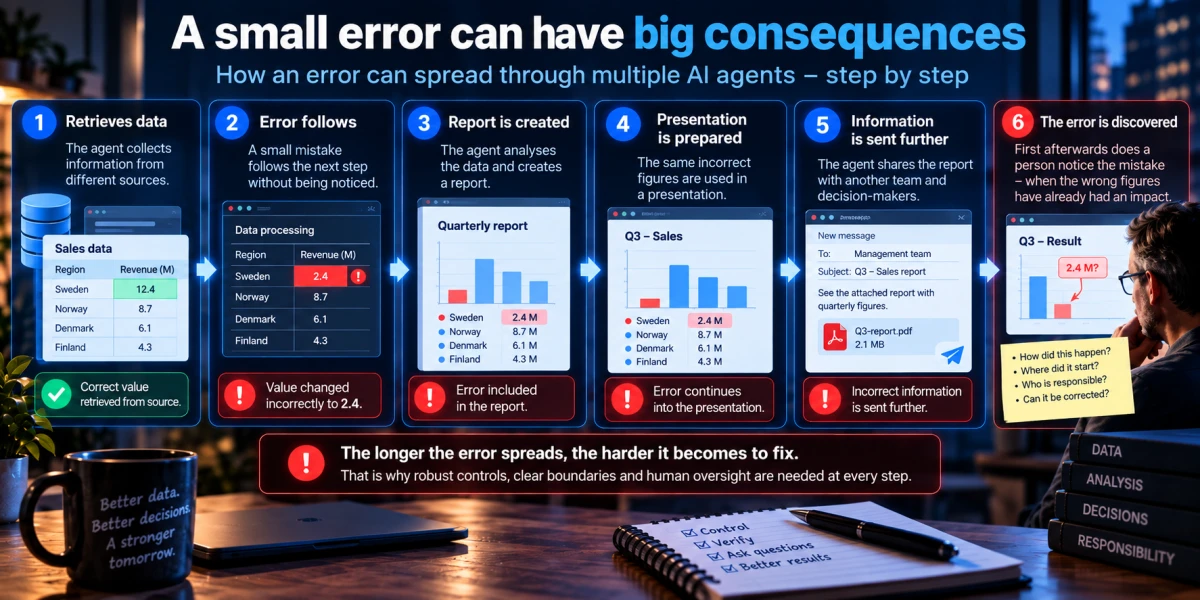
Imagine one agent misreading a customer value. Another places it in a document. The document feeds an internal report, the report becomes an email and the email influences a decision. Every step may look plausible if nobody reviews the whole chain.
A bad draft can often be corrected. A sent email may be supplemented. A database change, payment, publication or customer communication can be much harder to unwind, especially once another person or agent has acted on it. Organisations need to distinguish reversible steps, steps that require approval and actions that should never be handed to an unsupervised chain.
In a realistic scenario, Agent A retrieves a data value, Agent B places it in a report, Agent C turns the report into a presentation and Agent D sends the presentation as a message or acts on its conclusion. Different points in that sequence have different degrees of reversibility. The analysis is not that such chains have a measured prevalence, but that automation can increase the speed at which an error propagates when controls are missing.
Who Knows What Actually Happened?
When an employee makes a mistake, it is often possible to find the account, document and time. When several agents work together, the investigation becomes harder: which agent initiated the work, which identity was used, which tool was called and which data was available?
Agent inventory, identity, least privilege, logs, observability and clear ownership become the foundation for understanding an incident. Agent 365 points toward such a control plane, but it only works where an organisation has actually registered agents and connected them to policy and security systems.
After an incident, an organisation may need to ask: Which agent started the work, and on whose behalf? Which identity was used? Which data was accessed, which tools were called and which connector or API version was involved? Which other agent received the result? What was already sent or changed, and what can still be reversed? Several systems may each have logs without those logs forming a readable account of the same event.
A kill switch can stop future actions. It cannot automatically retrieve an email that has been read, a document that has been downloaded or a decision already made. Security therefore needs prevention, detection, containment, incident response and rollback where rollback is genuinely possible.
Microsoft’s security research illustrates why architecture matters. Defender signals found that 15% of the remote MCP servers Microsoft observed were severely insecure, with unauthenticated access to sensitive data or operational functions. That is not 15% of all MCP servers globally. Microsoft has also described patched Semantic Kernel vulnerabilities where prompt injection could be chained to host-level RCE through agent tools.
AutoJack similarly showed how a browsing agent and a local MCP control plane could create a dangerous chain. The case was fixed during development and the affected WebSocket surface was never in a PyPI release. These are not ongoing mass incidents; they show why tool permissions, isolation and authenticated control planes matter.
Can Windows Keep Up With Its Own Evolution?
Microsoft, Google, Adobe, API providers, connector developers and security teams update their pieces independently. An agent may gain a new capability while an app changes its permission dialog or a security policy blocks a call. That is not an argument against progress. It is an argument for treating agent integrations as living systems with version management, testing, logs and clear ways to limit or disable an integration.
Cloud services can provide more consistent policies, separate identities and better observability, but they also create dependencies on a provider’s availability, data handling, pricing and control plane. Who owns the integration can become almost as important as who owns the computer.
Microsoft as Traffic Controller — and Gatekeeper
If Windows becomes the place where a person’s requests, agents’ permissions, app data and company policy meet, Microsoft takes on a strategic role. That does not mean Microsoft is disadvantaging competitors. It does make the question legitimate: will Google, Adobe and other agent platforms have the same practical ability to integrate as Microsoft’s own services?
Windows may legitimately need to protect people from insecure or over-privileged agents, especially when those agents can reach files, accounts and tools. But the company that defines security requirements, integration surfaces and exposed capabilities can also influence how readily third-party agents compete and integrate. That is both a legitimate security requirement and an interoperability and competition question; it is not, by itself, evidence that Microsoft is abusing the role.
The UK Competition and Markets Authority is examining bundling, interoperability, defaults and how AI competitors can integrate with Microsoft business software in an ongoing SMS investigation. The CMA has not found, in these sources, that Microsoft acted anti-competitively. The European Commission has also identified equal access for AI-based services to operating systems as a DMA issue. That is broader AI-and-OS regulatory context, not a decision about Windows agent features.
Another Model: Specialist Agent Platforms
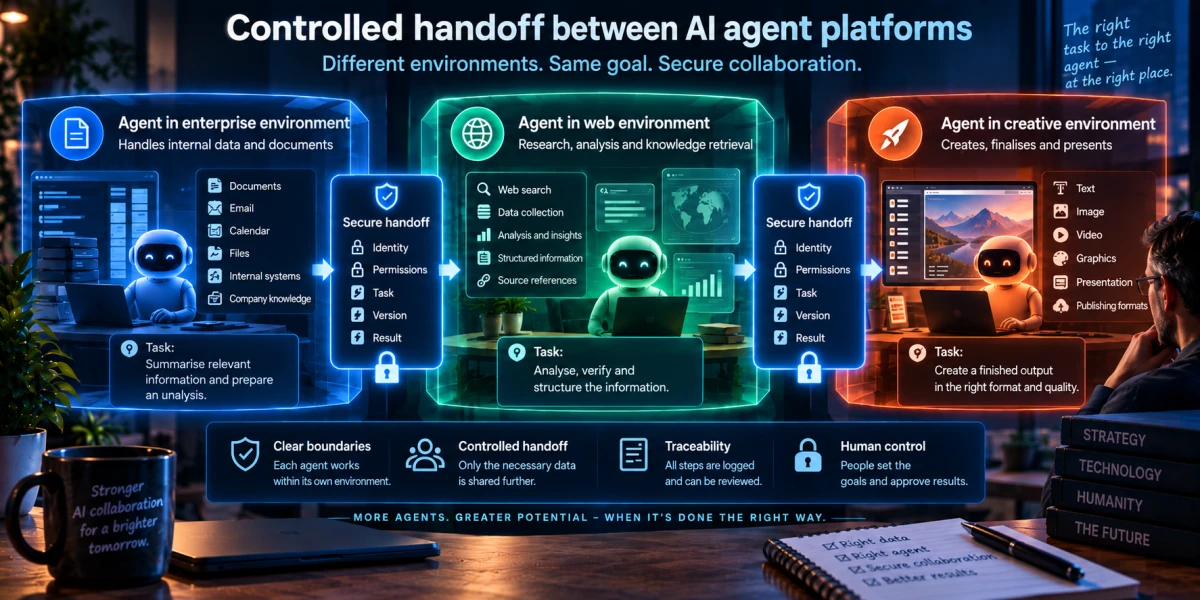
NextNet analysis / future scenario: the most durable model may not be one universal Windows agent directly controlling every app. Microsoft could handle the Microsoft environment, Google the Google environment and Adobe the Adobe environment. Each vendor could keep its own apps and agent functions compatible internally while the systems cooperate across controlled boundaries.
A Microsoft agent might retrieve the current report and request image work. An Adobe agent could perform the creative work in Adobe’s environment and return a verifiable account of what it did. The Windows agent would not need to imitate knowledge of every detail in Photoshop, Gmail or a custom business system. The trade-off is new power and security boundaries: vendor lock-in, harder data governance and dependence on shared standards. Who decides which task may cross a boundary, which data goes with it and what happens when a vendor changes policy?
When Agent Handoffs Start to Look Like Transactions
System A can request a clearly bounded operation from System B. System B performs the work in its own environment. System A does not need to understand every internal button and file, but it does need to verify who acted, on what basis, under which authority and with what result.
A future handoff could in principle carry identity, authority, purpose, state or version, provenance, an expiry time, a receipt, a result and an audit trail. A2A, MCP, App Actions and identity systems point toward pieces of that direction. Together, they are not a finished universal transaction model.
NextNet analysis / future reasoning: an agent handoff may need to be treated more like a secure transaction than a conversation. The receiving system may need to return a receipt, the operation performed, the basis used and any changed state or version. This is an analytical model, not an announced product plan.
Were Today’s Operating Systems Built for the AI Era?
Over the next five to ten years, human → app may be joined by human intent → agent → tools → another agent → cloud service → data → action. The operating system’s job would no longer be only to launch apps and keep files in order. It could also help determine who may do what, in which environment and with what traceable accountability.
NextNet reflection: a new operating system may be starting to emerge inside the old one. Not as a finished Microsoft goal, but as a layer of identity, policy, tools, agent communication and control above systems people already use.
That does not require the desktop, windows, taskbar or familiar applications to disappear. Windows may remain recognisable while the layer beneath it takes on more responsibility for identity, delegation, authority, policy, provenance, handoff, audit and containment.
Will Windows Still Be Windows?
Windows will probably look familiar for a long time. People will continue opening apps and making decisions. But its underlying role may shift from the system that runs programs toward the system that governs how people, programs and intelligent agents are allowed to work together.
The question is not only whether Microsoft can make Copilot more capable. It is whether the industry can build an environment where agents gain useful scope without control, security, competition and accountability falling between systems.
NextNet analysis: the more continuous work agents perform, the more important it may become that people can still understand what happened when automation fails. It is not enough for an organisation to say it has logs if nobody can reconstruct why a decision, handoff or action occurred.
Key Takeaways
Microsoft is already building components. Agent identity, isolation, policy and monitoring are documented directions, but not everything is generally available.
More vendors change the problem. Google, Adobe and others can build agent layers around their own apps and data.
UI automation is more fragile. More structured integration surfaces can be easier to test, log and update.
Security is about authority. The issue is not only what an agent can do, but what it is allowed to do and how that is reviewed.
Errors can spread. When one result becomes another system’s input, a small error can travel through a chain.
Regulators are already looking at boundaries. Interoperability, defaults and AI integration are competition questions.
The OS role may change. Windows can remain familiar while taking on more responsibility for the relationship between people, apps and agents.
💬 What do you think?
How much control would you be willing to hand over to an AI agent on your own computer?
Share your thoughts in the comments.
📚 Related Articles
Frequently Asked Questions About AI Agents and Windows
Vad är din reaktion?
 Gilla
0
Gilla
0
 Ogilla
0
Ogilla
0
 Kärlek
0
Kärlek
0
 Rolig
0
Rolig
0
 Wow
0
Wow
0
 Ledsen
0
Ledsen
0
 Arg
0
Arg
0

Hej, jag heter Staffan Carlsson
Jag är grundare och ansvarig utgivare för NextNet.se – en svensk nyhetsplattform med fokus på artificiell intelligens, teknik, cybersäkerhet och digital innovation.
Varför NextNet?
Jag startade NextNet med målet att skapa en modern och lättillgänglig nyhetssajt där teknik och AI står i centrum. Den tekniska utvecklingen går snabbare än någonsin, och jag tror att det är viktigare än någonsin att kunna förstå vad som händer – utan att behöva vara expert.
Genom NextNet vill jag lyfta fram nyheter, analyser och trender som hjälper läsare att navigera i en allt mer digital värld.
Mitt teknikintresse
Teknik har varit en stor del av mitt liv under många år. Jag fascineras av hur innovation, internet och artificiell intelligens förändrar sättet vi arbetar, kommunicerar och bygger framtidens samhälle.
Utöver arbetet med NextNet ägnar jag mycket tid åt webbplattformar, servermiljöer, AI-lösningar och digitala projekt där nyfikenhet och lärande alltid står i centrum.
Min vision
Jag vill att NextNet ska vara en trovärdig och inspirerande källa för alla som vill följa utvecklingen inom AI, teknik och digitalisering – oavsett tidigare kunskapsnivå.
AI-drivna nyheter för en digital värld.











Kommentarer (0)